

I ran deconvolution on my own redaction output — here is what came back
I blurred a fabricated API key, then ran Richardson–Lucy deconvolution with the exact kernel to see how much came back. The honest answer, with images.
Every screenshot tool ships a blur brush, and people use it to hide API keys, account numbers and email addresses before posting. The standard line — including the one we have written ourselves — is that blur is a linear transform and linear transforms are invertible, so the data is still there.
That is true as far as it goes. But “invertible in principle” and “I got the key back” are different claims, and I had never actually measured the gap. So I did.
The short version: deconvolution alone did not return the key at any blur strength that genuinely hid it. And the key was still identified, by a method that never tries to invert anything. Both halves of that matter.
What I tested and why
I built a small panel of the kind people redact constantly — a secret key, an account identifier and an internal email address:
sk_live_4eC39HqLyjWDarjtT1zdp7dc
acct_1M2n3B4v5C6x7Z8a
[email protected]
Every value is fabricated. sk_live_4eC39HqLyjWDarjtT1zdp7dc is Stripe’s own published
documentation placeholder and has never been a live credential.
I ran this because I had been repeating the theory without having run the experiment, and because I wanted to know which of the failure modes in my own tool were real.
Method
Monospace text at 17px on white, the size you get in a real console screenshot. Then, for each of sigma 2, 3, 4, 6 and 8:
- Blur. A separable Gaussian, kernel radius
ceil(3 * sigma), reflect padding at the borders. Reflect rather than zero padding matters — zero padding darkens the edges and produces a halo that flatters the recovery. - Recover. Richardson–Lucy deconvolution, 50 and 200 iterations. A Gaussian is symmetric, so the flipped PSF in the correction term is the same kernel.
The important detail is that I handed the attacker the exact kernel. Real recovery has to estimate sigma from the image first. Everything below is therefore an upper bound on what deconvolution buys you, not a typical result.
What came back
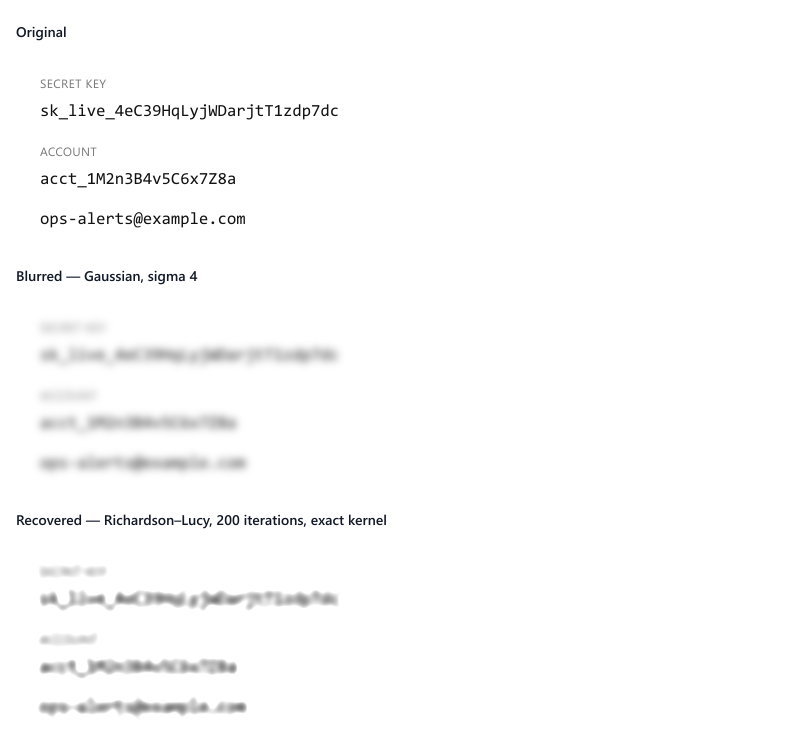
Reading the panels honestly, at sigma 4:
[email protected]comes back readable.sk_live_andacct_— the fixed prefixes — come back readable.- The random tail of the key,
4eC39HqLyjWDarjtT1zdp7dc, does not. You get character shapes, stroke weight and length. You do not get the characters.
At sigma 6 and 8, nothing legible came back at all. The recovery is visibly sharper than the blur and word boundaries emerge, but no character is readable.
At sigma 2 the recovery is essentially perfect — but sigma 2 never hid the text in the first place. You can read the key straight off the blurred image without touching it. That case proves nothing, and I mention it only because a comparison that quietly used a weak blur would look far more impressive than it deserves.
So the naive version of the claim — blur it, someone runs deconvolution, they get your key back — did not hold up in my own test. If that is the whole argument, it is weaker than people repeat.
The attack that actually works
Deconvolution asks the hard question: what image produced this? Text does not require the hard question, because the space of possible answers is tiny.
So I ran a second test at sigma 6 — the strength where deconvolution had returned nothing. Instead of inverting, I rendered candidate strings in the same font and size, blurred each one with the same kernel, and compared them to the target by sum of squared difference. 250 candidates, built from plausible mailbox names and domains.
The true string ranked first, and not narrowly:
| Rank | Candidate | SSD |
|---|---|---|
| 1 | [email protected] | 0.000 |
| 2 | [email protected] | 0.012 |
| 3 | [email protected] | 0.186 |
The runner-up differs by a single character — a hyphen instead of a dot — and is still cleanly separated. This is what Depix does for pixelation, and it works against Gaussian blur for the same reason: you never have to recover anything if you can re-create it and check.
Two honest caveats. I rendered the candidates with the same renderer, font, size and pixel offset as the target, which is why the winner scores exactly zero — a real attacker has to match those first. And a full 24-character random key is not searchable this way; the whole point of a random key is that its space is not small.
But most of what people blur is not a random key. It is an email address, a name, a customer ID with a known format, a domain, a street. Those are all small spaces. And notice what the failed deconvolution still gave up: length, word boundaries and character shapes — exactly the constraints that shrink a candidate set before you start searching.
What this means for the three failure modes
The reason to care is not that someone will run Richardson–Lucy against your screenshot. It is that blur leaves the original signal present in the file, and there is more than one way to read it. Which puts the weight back on where the pixels actually live:
- PNG with an alpha channel can preserve the original underneath the mask. The visible result looks covered; the file still carries what was there.
- Some editors keep the redaction as a separate layer, so the original survives inside the file and moving one object exposes it.
- Autosave and crash-recovery files often hold the pre-redaction version, so a clean export can sit on disk next to a dirty temp file.
If the original pixels exist anywhere in the output — a layer, a channel, a temp file — nothing was redacted, and no argument about kernels is needed to break it.
I went through this exercise on my own code and found more than one of the failure modes above in it. That is what prompted writing this up, and it is why 1.6.2 shipped as a security release rather than a feature one.
What to do instead
Replace the pixels. Not a layer on top — the actual pixel values, flattened into the output. Solid opaque fill, no alpha channel, re-encode the file.
Then test your own workflow rather than trusting the tool. Blur some text, save it, reopen the saved file, and push brightness and contrast to their extremes. If shapes resolve, the signal survived. For the stronger check, render what you think the text said, blur it the same way, and compare — if you can match it, so can someone else.
Related reading
- Can blurred text be recovered? — the underlying theory this post set out to test.
- How to redact a screenshot on Windows — the practical steps, tool by tool.
- Redacting screenshots for GDPR — why “we blurred it” is a compliance problem.
- Removing an object from a screenshot
Try it on your own screenshot
SnapShield AI redacts on your machine — no upload, no account, no expiry. Free tier available, 84 MB, Windows 10 and 11.
Download Free